iPhone Background Sounds or a sound app: when the built-in one is enough
Written by the team that builds Luten, so we are not neutral about it. Updated 22 November 2026.
The short answer
You may not need an app. Background Sounds is built into iPhone, costs nothing extra, and plays steady noise or nature sound on its own or under your music, with a timer on iOS 26 or later. Turn it on in Settings, then Accessibility, Audio & Visual, Background Sounds. A sound app such as Luten is worth a look when you want more than Apple's set: sounds grouped by what you are doing, a session that moves from track to track, a chat that suggests a sound, Android, or on iPhone, widgets and CarPlay.
What Background Sounds does well
Apple added Background Sounds in iOS 15 and keeps it in the accessibility settings. This is what Apple's iPhone guide and its Background Sounds page describe:
- Nothing to install. It is part of iOS, and Apple documents it for iPad, Mac and Apple Vision Pro too.
- Noise and nature sounds. Apple names balanced, bright and dark noise, ocean and rain among them.
- It plays under other audio. Turn on Use When Media is Playing, then set Volume with Media, and the sound carries on under your music or a podcast.
- A timer. On iOS 26 or later, a timer in the same screen stops it at a time you pick or after an amount of time you choose.
- An Equalizer. Also on iOS 26 or later, you can shape the tone and move the balance left or right.
- Lock and Control Center. The Stop Sounds When Locked switch decides whether it stops when the phone locks, and a Control Center button starts it, stops it or switches the sound.
- Shortcuts. Apple describes adding a shortcut that turns it on when you do something such as turning on a Focus, and its iPhone guide points to starting it with a button press through the Accessibility Shortcut.
- Your hearing settings. Apple says Headphone Accommodations apply to it automatically.
Our step by step guide to Background Sounds shows where each of these settings is.
When Background Sounds is enough
Stay with the built-in feature if most of these are true for you:
- You want one steady sound, and Apple's set has one you like.
- You want it under your own music, a podcast or a video.
- You only use Apple devices.
- You would rather not install another app.
If that is you, stopping here is a perfectly good choice.
Where it stops
Background Sounds is a setting rather than a player, so some things sit outside what it does:
- Apple's sounds only. Apple's pages describe picking from its own set, and nothing for adding other recordings. The sounds aren't grouped by what you are doing.
- The sound you picked. It plays the one you chose. Apple's pages describe no mix that moves from one sound to another.
- No Android. It is an Apple feature, so it isn't on Android phones.
- The end of the timer. Apple's pages don't say whether the sound fades out when the timer ends or simply stops.
What a sound app adds, with Luten as the example
Luten is a sound app for iPhone and Android, and we make it, so read this part with that in mind. Everything below is in the app now.
Sections for what you are doing
Luten's Home screen lists Sona and five sections: Sleep, Focus, Stress, ADHD and Kids. Each section has its own sounds, from white, pink and brown noise, rain, ocean and fan to cafe, library, forest and world soundscapes.
A session that moves from track to track
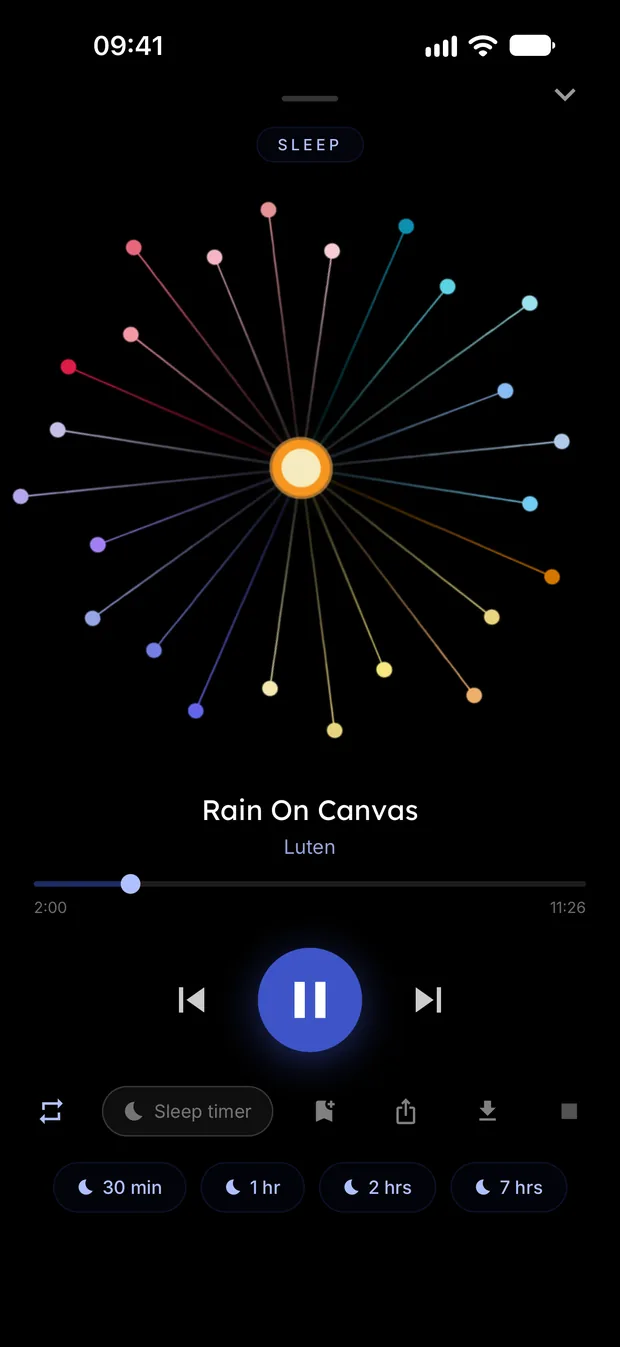
In Sleep, Focus, Stress and ADHD, tap Adaptive Session. Luten builds a session for that section and plays it, with a crossfade wherever it moves from one track to the next. Tap it again to stop.
Say how you feel, get a sound
Sona is the chat in Luten. Type how you feel in your own words, and Sona suggests real tracks you can play from the chat. Sona runs on the phone, and the words you type to Sona stay on the phone.
It learns which sounds you keep
Luten keeps a record on the phone of the sounds you play and the ones you skip, and uses it as one of the signals behind its Recommended for you row.
A sleep timer that fades
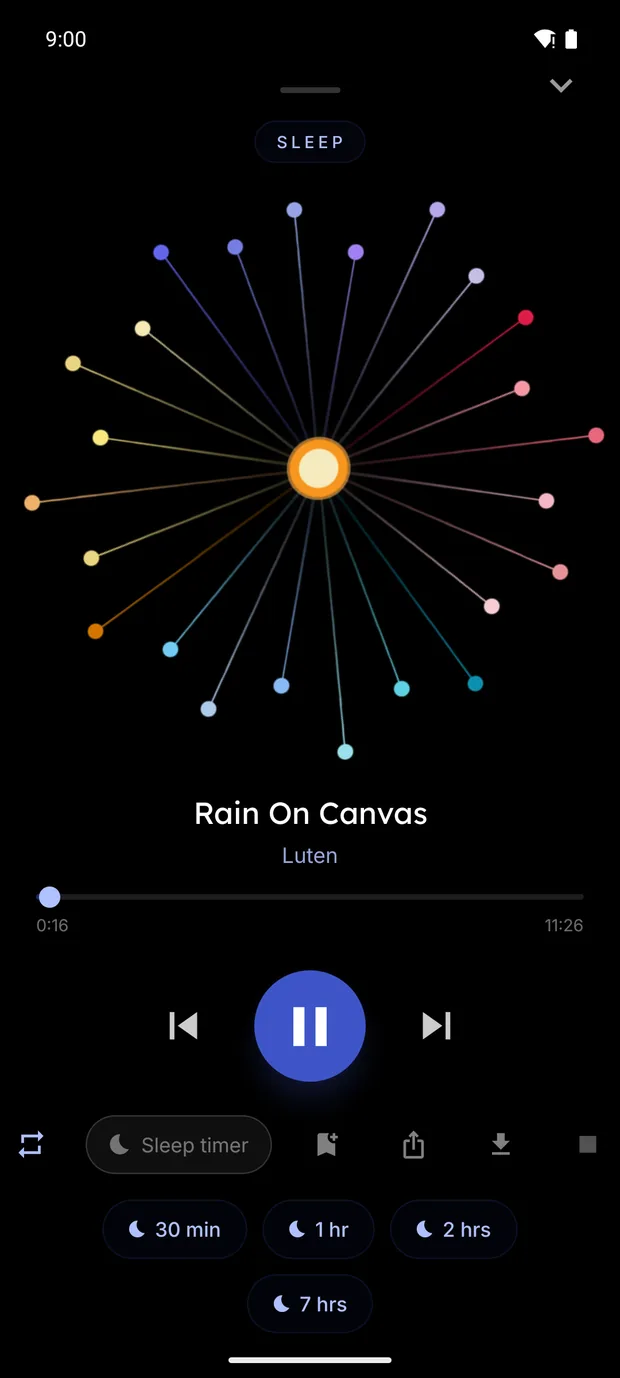
In the player, tap Sleep timer and pick a length. With a sound you tapped from a list, it gets quieter over about 20 seconds when the time is up, then pauses.
On Android too
The sections, the player, Sona and the sleep timer are in the Android app on Google Play. Battery savers on some Android phones can stop apps in the background, so check that setting if a sound stops when you don't expect it to.
Beyond the phone, on iPhone
- Widgets: Home Screen and Lock Screen widgets open Luten and start a section with one tap. The medium Home Screen widget also has sleep timer buttons.
- Siri and Shortcuts: on iOS 18 or later, say "Play Sleep sounds in Luten", or add Luten's Play Sounds action in the Shortcuts app.
- CarPlay: the sections are on the car screen, and Sleep and Kids are marked for passengers.
- Apple Watch: the Luten watch app points you to Now Playing, where you can control a sound you started on the iPhone.
What Background Sounds does that Luten doesn't
To be fair to Apple, two differences go the other way:
- Sound under your music. Playing a sound in Luten pauses whatever else is playing, such as a song or a podcast. If you want a sound under other audio, Background Sounds with Use When Media is Playing is the tool for it.
- Nothing extra on the phone. Luten is another app to install and open. Background Sounds is already there.
A fair way to choose
- Turn on Background Sounds and pick a sound. Lock the phone and check that it keeps going.
- If you mainly want a sound under a podcast or music, you can stop here.
- If not, install a sound app and play the same kind of sound, such as rain, or Apple's dark noise next to a brown noise.
- Set the timer in both, and listen to how each one ends.
- Keep the one you reach for. You can also use both: Background Sounds under other audio, and an app when you want a section, a mix or a sound on Android.
Try Luten
Sleep and focus sounds, on iPhone and Android. Free to download, with an optional subscription that starts with a 7 day free trial.
Questions
Is iPhone Background Sounds as good as a white noise app?
For one steady sound on iPhone, it may be all you need, and it plays under other audio, which Luten doesn't. A white noise app adds its own sounds and, in Luten's case, sections, Adaptive Sessions, Sona and an Android app, plus widgets, Siri phrases and CarPlay on iPhone.
Do iPhone Background Sounds turn off by themselves?
They can. With Stop Sounds When Locked on, they stop when the phone locks. On iOS 26 or later, the timer stops them at a set time or after an amount of time. And unless Use When Media is Playing is on, they don't play alongside other audio.
Can Luten play under my music like Background Sounds?
No. Playing a sound in Luten pauses other audio. For a sound under music or a podcast, use Background Sounds with Use When Media is Playing.
Does Sona send what I type anywhere?
The words you type don't. Sona runs on the phone, and what you type is never uploaded. Each reply does send a usage event with the section Sona matched, a broad label for the kind of message, whether Sona understood it and how many sounds it suggested, as the Privacy Policy describes.
Related guides
- How to use Background Sounds on iPhoneTurn on the noise and nature sounds built into iPhone, play them under your music, set the timer, and see where an app like Luten fits.
- How to choose a white noise or sleep sounds appWhat to check in a white noise, sleep sounds or sound machine app: locked playback, the loop, the timer, ads and privacy. Plus the built-in options.
- How to set a sleep timer on iPhone or AndroidStop music and sounds on a timer: the built-in way on iPhone, the options on Android and Samsung, Spotify, Tidal and Apple Music, and Luten's fade.
Sources
- Apple Support: Play background sounds on iPhone: https://support.apple.com/guide/iphone/play-background-sounds-iphb2cfa052c/ios
- Apple Support: Use Background Sounds: https://support.apple.com/en-us/109346
- Apple Support: accessibility features for older adults: https://support.apple.com/en-us/126977