How to use Background Sounds on iPhone
Written by the team that builds Luten, so we are not neutral about it. Updated 7 November 2026.
The short answer
Background Sounds is built into iPhone. Open Settings, tap Accessibility, tap Audio & Visual, tap Background Sounds, then turn it on. Tap the sound to pick another, such as rain or ocean, and drag the slider to set the volume. On iOS 26 or later there is also a timer and an Equalizer. You don't need an app for this. A sound app such as Luten adds its own player, sounds such as cafe, library and world soundscapes, and Android.
Turn on Background Sounds
Apple added Background Sounds in iOS 15. It sits in the accessibility settings, which is why many people never find it.
- Open the Settings app.
- Tap Accessibility, then Audio & Visual, then Background Sounds.
- Turn on Background Sounds.
- Tap Sound, then pick one.
- Drag the volume slider until it sounds right.
Apple's steps give ocean waves and rain as examples, and Apple also lists balanced, bright and dark noise. The list can change between versions, so check the one on your phone.
Turn it on faster
Going through Settings each time gets old. Apple describes two shortcuts.
- Control Center: add the Background Sounds button to Control Center. Press and hold it, then tap Background Sounds to start or stop, or pick another sound. Scroll down to Background Sounds Settings for the rest.
- The Accessibility Shortcut: Apple's page links to Quickly turn accessibility features on or off, which lets you start it with a triple-click.
Play it under music or a podcast
In the same Background Sounds screen, turn on Use When Media is Playing. Then drag the Volume with Media slider to set how loud it is next to your music. This is something Background Sounds does well, and it is the main reason to use it over an app.
Set a timer
On iOS 26 or later, Background Sounds has its own timer:
- In the Background Sounds screen, tap Stop Sound with a Timer (on iOS 26 it is called Stop Sounds with a Timer).
- Turn on Timer.
- Pick At a specific time or After an amount of time, then choose an option.
On earlier versions you won't see this option. Apple's page for that timer doesn't say whether the sound fades out.
Change the tone with the Equalizer
Also on iOS 26 or later, tap Equalizer and turn it on. Drag across the Tone grid to pick a range of frequencies, or choose Broad for wider ranges and Focused for narrower ones. The Balance slider moves the sound left or right. Our guide to green noise uses this to shape a noise by ear.
If Background Sounds won't play or keeps stopping
Apple's page doesn't have a troubleshooting section, but these settings on it are the first places to look:
- It stops when the phone locks: check Stop Sounds When Locked. If it is on, the sound turns off each time you lock the phone.
- It goes quiet when music starts: turn on Use When Media is Playing, and check the Volume with Media slider isn't all the way down.
- It stops on its own: check the timer setting, and whether Always use these settings is on.
- You can't hear it at all: check the Background Sounds volume slider, and the phone's volume too.
If none of these helps, Apple Support is the place to ask, because the feature is part of iOS.
Where a sound app fits
Background Sounds is built in, and for many people it is enough. It is also iPhone, iPad, Mac and Vision Pro only, and kept in Settings with Apple's own set of sounds.
Luten is a sound app for iPhone and Android. It has white, pink and brown noise, rain, ocean, fan, cafe, library, forest and world soundscapes, with no narration or lyrics, and it runs no third-party ads. You pick a section such as Sleep or Focus, tap a sound and it plays, with the phone locked too.
Its sleep timer is in the player. Tap Sleep timer and pick a length. When the time is up, the sound gets quieter over about 20 seconds and then pauses.
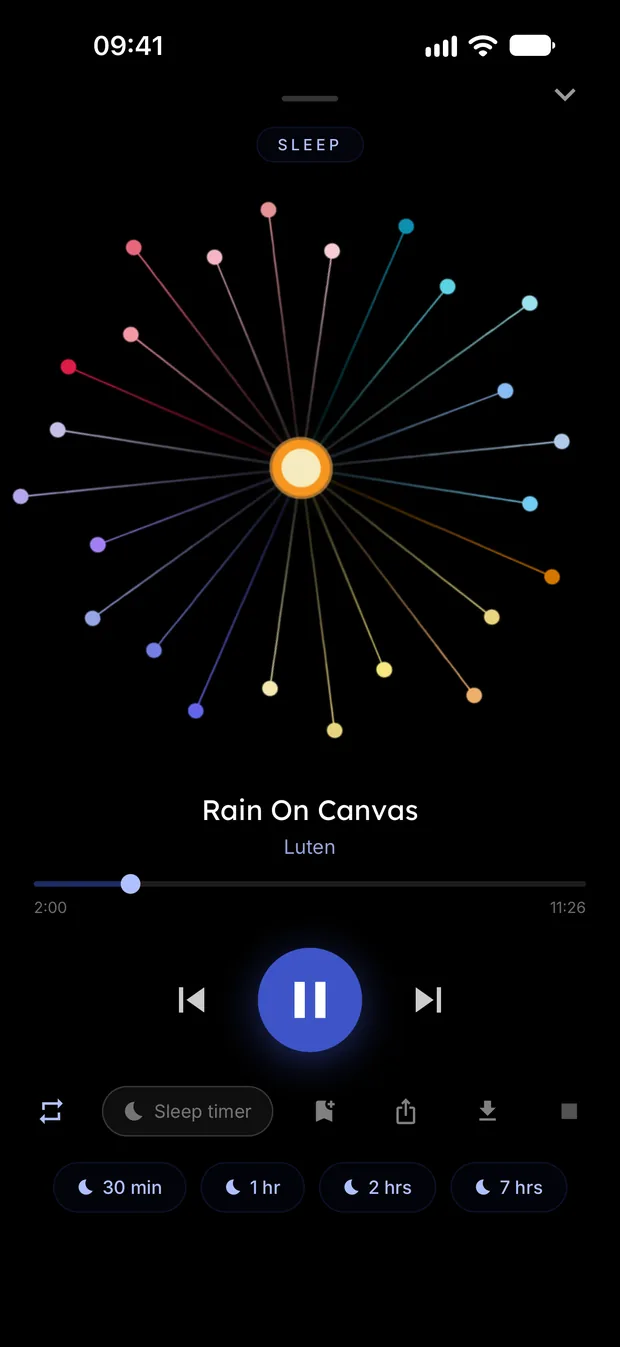
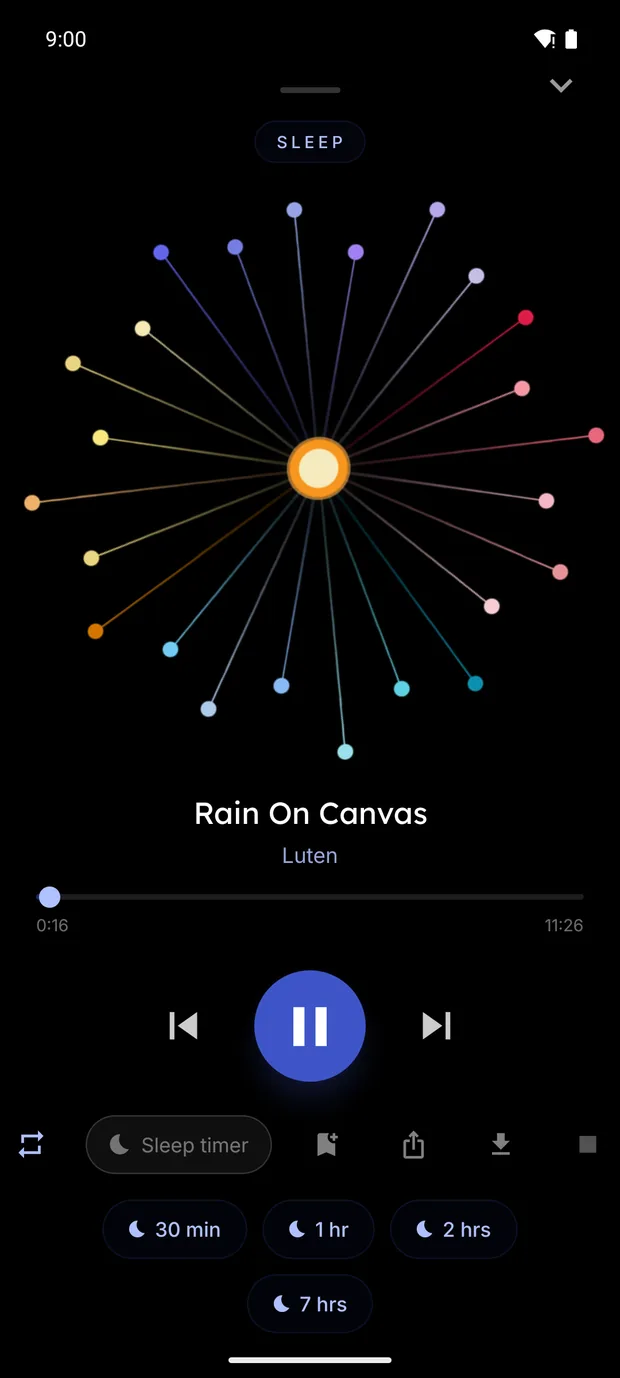
On Android, a battery saver on some phones can stop apps running in the background, so check that setting if a timer doesn't behave.
One difference to know: Luten is made to be the only thing playing, so starting it pauses your music. If you want a sound under your own music or podcast, Background Sounds with Use When Media is Playing is the better tool.
Try Luten
Sleep and focus sounds, on iPhone and Android. Free to download, with an optional subscription that starts with a 7 day free trial.
Questions
Where is Background Sounds on iPhone?
In Settings, under Accessibility, then Audio & Visual, then Background Sounds. You can also add a button for it to Control Center.
Does Background Sounds have a timer?
On iOS 26 or later, yes. Tap the timer option in the Background Sounds screen. On earlier versions, there isn't one there.
Can I play Background Sounds with music?
Yes. Turn on Use When Media is Playing, then set the Volume with Media slider.
Is there Background Sounds on Android?
Background Sounds is an Apple feature. On Android, use a sound app, such as Luten, or a video or music app that has the sound you want.
Related guides
- How to set a sleep timer on iPhone or AndroidStop music and sounds on a timer: the built-in way on iPhone, what to do on Android, Spotify and Apple Music, and how the timer in Luten fades out.
- What is green noise?Green noise has no fixed definition. Who says what, how it differs from white, pink and brown noise, and where to find or make it.
Sources
- Apple Support: Play background sounds on iPhone: https://support.apple.com/guide/iphone/play-background-sounds-iphb2cfa052c/ios
- Apple Support: Use Background Sounds: https://support.apple.com/en-us/109346
- Apple Support: accessibility features for older adults: https://support.apple.com/en-us/126977
- Apple Support: Quickly turn accessibility features on or off on iPhone: https://support.apple.com/guide/iphone/quickly-turn-accessibility-features-on-or-off-iph3e2e31a5/ios