 cassette deck
How to transcribe voice memos on iPhone or Android
Written by the team that builds Cassette, so we are not neutral about it. Updated 7 November 2026.
The short answer
On iPhone 12 or later, open Voice Memos, tap the recording, tap the More button and choose Copy Transcript. Paste the text wherever you want it. On Android it depends on the phone: Pixel's Recorder and Samsung's Voice Recorder can both write a transcript, on the phones and in the languages they support. If you also want your to-dos pulled out of what you said, Cassette does that. On iPhone, iPad and Mac it also takes a recording you already have: share the memo to Cassette on iPhone or iPad, or drag the file onto its Shelf on a Mac. On Android, Cassette writes up only tapes it records itself.
On iPhone: use Voice Memos
If the memo is already in Voice Memos, you don't need another app. Apple lists transcription for iPhone 12 or later.
- Open Voice Memos. It may be in the Utilities folder.
- Tap the memo you want as text.
- Tap the More button.
- Choose Copy Transcript to take all of it, or View Transcript to read it and select only a part.
- Paste the text into a message, a note or a document.
Old memos work too. Apple says a recording made on iOS 17 or earlier gets transcribed when you open it, as long as it has speech in it.
Apple lists English, Spanish, Portuguese, Italian, French, German, Japanese, Korean and Chinese, and transcription isn't offered in every country or region. If you don't see the option, update iOS, then check that your iPhone, language and region are covered.
Or record in the Notes app
For a new recording, the Notes app can record and transcribe on the same iPhones. In a note, tap the attachments button and choose Record Audio. When you finish, tap the recording to review the transcript, and use Add Transcript to Note to keep the text in the note.
On a Mac: open the same memo there
If Voice Memos syncs through iCloud on the same Apple Account, your iPhone's memos show up in Voice Memos on a Mac. Click the recording, click the Transcription button, then select the text and copy it.
This also helps if your iPhone is too old. Apple says the Mac app transcribes a recording made on a device that doesn't support transcription, as long as it includes speech.
On Android: it depends on your phone
The recorder depends on who made your phone, so start with the one yours came with.
- Pixel: open the Recorder app, tap a recording and tap Transcript. To transcribe it in a different language, tap More, then Transcribe again. Google notes that doing this may process the audio on its servers.
- Samsung Galaxy: open Voice Recorder, select the recording, tap the Transcript assist icon (four stars) and tap Transcribe. Samsung says this needs a select phone or tablet on Android 14 with One UI 6.1 or higher. You can move the text to Samsung Notes from the More options menu.
- Other phones: open your recorder and look for a transcript option. If there isn't one, it only saves the audio.
When a transcript isn't what you wanted
A transcript gives you every word, including the "um" and the part where you changed your mind. If you talk to your phone to remember things, what you want is usually the list, not the wall of text.
That is what Cassette is for. It runs on iPhone, iPad, Mac and Android, and it works like a tape deck. On iPhone, iPad and Mac it can also take a memo you already have. Cassette for Android can't add a file yet. On Android it writes up only tapes it records itself, so for recordings you already have there, use the steps above.
A memo you already have (iPhone, iPad and Mac)
- On iPhone or iPad, share the memo from Voice Memos, Files or another app and choose Cassette. Or open Cassette and press ADD FILE on the Shelf.
- On a Mac, drag the file onto the Shelf, or click ADD FILE. A long recording dragged straight from Voice Memos has to go to the Desktop first. Drag it there, then drag it from the Desktop onto the Shelf.
- Open Cassette if you shared from another app. The file is now a tape on the Shelf, and Cassette writes its transcript and notes, the same as for a tape it recorded.
Cassette reads M4A, MP3, WAV, AAC, FLAC, Opus and the sound in MP4. Your original file isn't changed. Cassette keeps its own copy and shows the file's name on the tape, and the free tier counts it the same way as a tape you record.
The next memo
- Press RECORD and say what's on your mind.
- Press STOP. Cassette writes the transcript and the notes on its own.
- Read the notes. A memo to yourself in English usually gets the gist, a list of to-dos with the day if you said one, and any ideas.
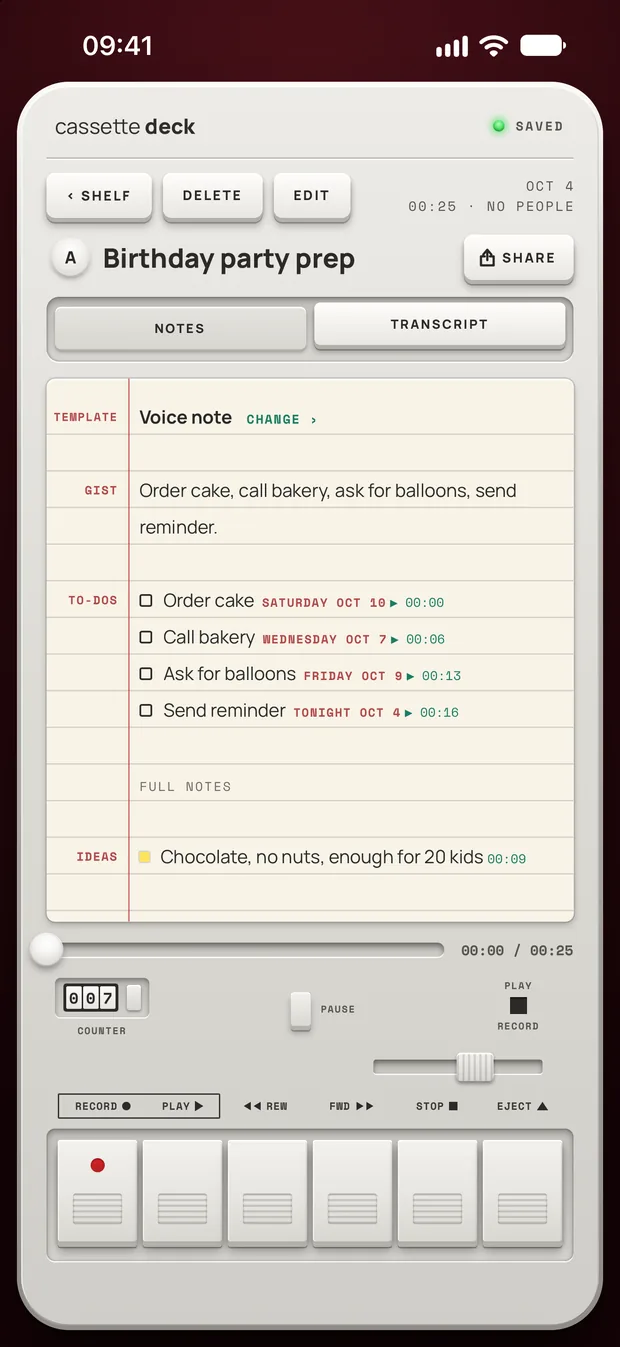
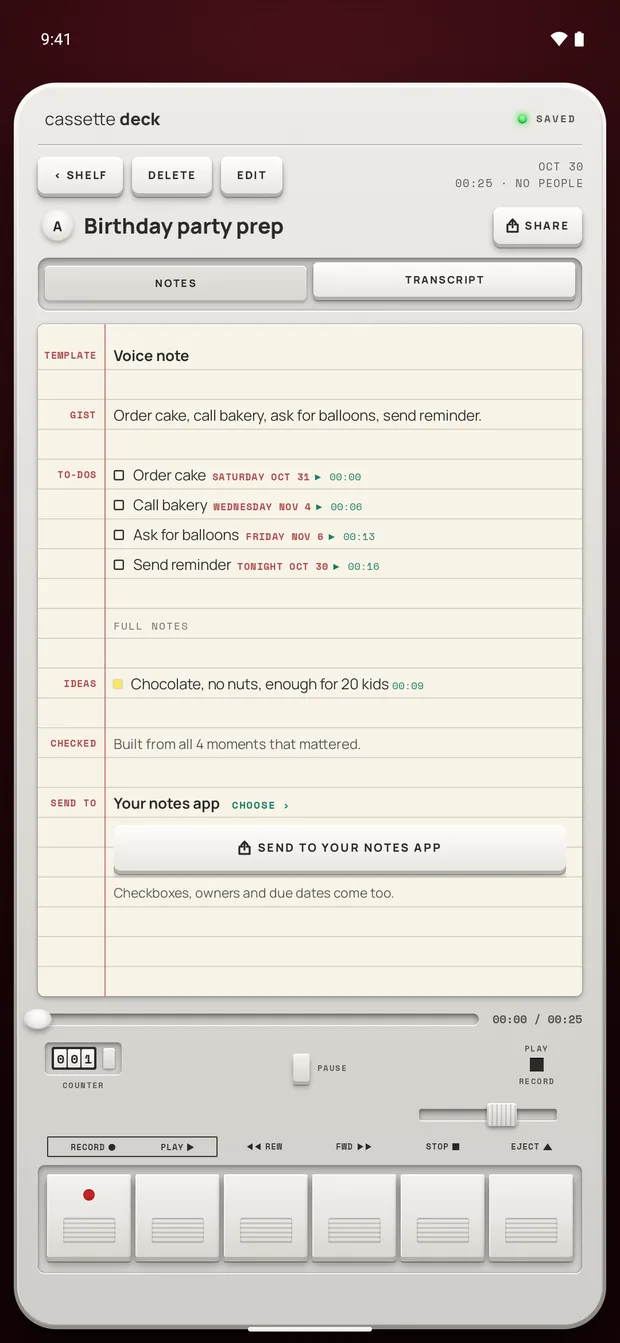
That list needs a device that can run the full notes model. An iPhone, iPad or Mac without Apple Intelligence or on a version before 26, or an Android phone with less than 8 GB of memory, gets simpler notes: a few lines quoted from the tape, with no gist or to-do list. Tapes in other languages get more general notes. The transcript and the recording are there either way.
To start faster, add the Cassette widget to your Home Screen. On iOS 18 or later, Control Center can start a tape too, and so can the Action button on iPhones that have one.
Getting the words out of Cassette
The full transcript sits on its own TRANSCRIPT tab, with the time beside each line. Tap a line to go to that moment on the tape.
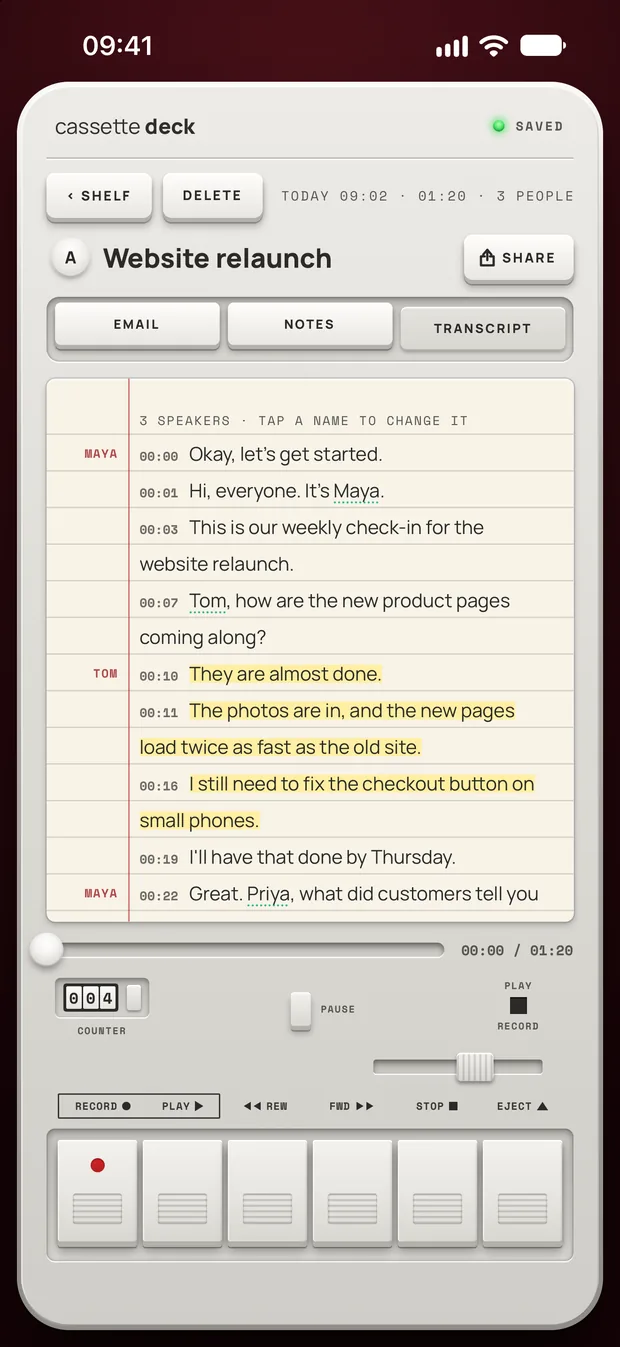
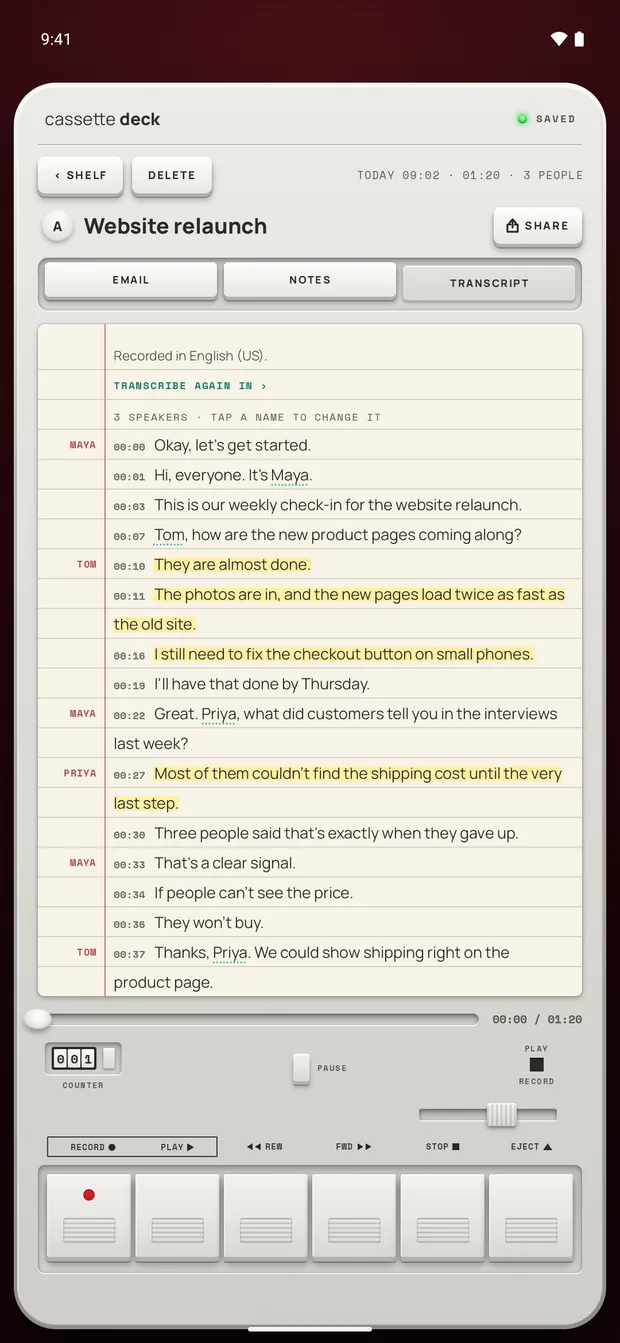
- Copy it. On that tab, tap SHARE and choose Copy Transcript.
- Save it as a file. The same menu saves it as PDF or Word.
Get cleaner text from any app
- Hold the phone close. Try a few inches from your mouth rather than arm's length.
- Move away from noise. Traffic, fans and music make mistakes more likely.
- Check names first. Names and uncommon terms are worth a second look before you share the text.
- Say the day out loud. "Call the bakery on Wednesday" gives a list something to work with. "Call them soon" doesn't.
Before you record
Ask first. Whoever you are recording should know about it, some places require everyone's consent, and it is the decent thing to do.
Try Cassette
Free to download. Recording is free and unlimited, tapes under 3 minutes get their transcript and notes free, and longer ones get them free for 2 tapes a month.
Questions
Can I transcribe a voice memo I already recorded?
If it's in Voice Memos or Pixel's Recorder, yes, with the steps above. On a Galaxy, try Transcript assist on the recording in Voice Recorder. Cassette can do it on iPhone, iPad and Mac. On iPhone and iPad, share the file to Cassette or press ADD FILE on the Shelf. On a Mac, drag it onto the Shelf or click ADD FILE. It gets a transcript and notes like any tape. Cassette for Android can't add a file yet.
Can I transcribe voice memos for free?
Apple's and Google's pages mention no fee for transcription, and Samsung says its basic Galaxy AI features are free. In Cassette, a tape under 3 minutes gets its transcript and notes free. Longer tapes count toward the 2 free tapes a month, and Premium covers the ones after that. A file you add on iPhone, iPad or Mac counts the same way.
Does Cassette need the internet to transcribe?
Not on Android, where the speech model comes with the app. On iPhone, it works in airplane mode for a language your phone supports on the device, once that language's speech model has downloaded.
What if Cassette hears the wrong language?
Open the tape's transcript, tap TRANSCRIBE AGAIN IN at the top and pick the right language.
Does my voice memo leave my phone in Cassette?
Notes are never written by an outside AI service. On Android, the audio is never sent anywhere to be transcribed or written up, and it only leaves the phone if you sign in with Premium, which backs tapes up. On iPhone there are more cases. If the phone can't transcribe a tape on the device, Apple's servers do it. On iOS 27, the notes can be written on Apple's Private Cloud Compute. Tapes also go in iCloud and computer backups, and in your account backup if you sign in with Premium. To stop all of that, turn on On-device only under Privacy in your iPhone's Cassette profile.
Related guides
- How to choose a lecture recording appHow to pick an app to record lectures and take notes: what the free built-in apps do, eight things that matter for a class, and how Cassette does.
- How to record a lecture on iPhone or AndroidRecord a lecture on your phone, mark what matters and get notes you can study from. Steps for iPhone and Android, with the built-in apps and with Cassette.
- How to use your Apple Watch as a voice recorderRecord your voice on Apple Watch with Voice Memos and find the recording on iPhone, or record in Cassette to get a transcript and notes.
Sources
- Apple Support: View a Voice Memos transcription on iPhone: https://support.apple.com/guide/iphone/view-a-transcription-iph00953a982/ios
- Apple Support: Record and transcribe audio in Notes on iPhone: https://support.apple.com/guide/iphone/record-and-transcribe-audio-iphbe11247b5/ios
- Apple Support: View a Voice Memos transcription on Mac: https://support.apple.com/guide/voice-memos/view-a-transcription-of-a-recording-vm4a03609f0d/mac
- Pixel Phone Help: Create, edit and manage transcriptions: https://support.google.com/pixelphone/answer/16267698?hl=en
- Samsung Support: Use Voice Recorder with Galaxy AI: https://www.samsung.com/us/support/answer/ANS10000942/