 cassette deck
How to use your Apple Watch as a voice recorder
Written by the team that builds Cassette, so we are not neutral about it. Updated 6 November 2026.
The short answer
Apple Watch comes with a voice recorder. Open Voice Memos on the watch, tap the Record button, and tap Stop when you finish. With iCloud, the recording shows up under Watch Recordings in Voice Memos on your iPhone. If you want a transcript and notes as well, Cassette records from the watch and sends each tape to your iPhone, which writes them.
Record with Voice Memos, the app already on your watch
If you only want to save what you said, you may not need to install anything. These are Apple's steps:
- Open the Voice Memos app on your Apple Watch.
- Tap the Record button.
- Tap the Stop button to end the recording.
- To listen on the watch, tap the recording, then tap Play.
Find a watch recording on your iPhone
With iCloud, you can play what you recorded on your paired iPhone and on other devices signed in to your Apple Account. Open Voice Memos on the iPhone, iPad or Mac and choose Watch Recordings.
If a recording isn't there, check two things:
- Each device is signed in to the same Apple Account.
- Voice Memos is on for iCloud. On iPhone, go to Settings, tap your name, tap iCloud, tap See All, then turn on Voice Memos.
It only works in one direction. Apple says recordings made on other devices don't appear on the watch.
Apple's watch page doesn't mention transcripts. To get text, open the recording in Voice Memos on an iPhone 12 or later, tap the More button and look for Copy Transcript, in the languages Apple lists. Either way, you get every word. With Apple Intelligence, Writing Tools can summarize it, but you do that yourself for each recording.
Record on your wrist with Cassette and get notes
Cassette is a tape deck for iPhone with an Apple Watch app. It needs an iPhone, because that is where the writing happens. The watch records and the iPhone does the rest. It needs watchOS 10 or later on the watch and iOS 17 or later on the iPhone.
Install Cassette on your iPhone. Apple says the watch version installs by default. If it doesn't show up, open the Apple Watch app on your iPhone, tap My Watch, tap Apps, scroll to Available Apps and tap Install.
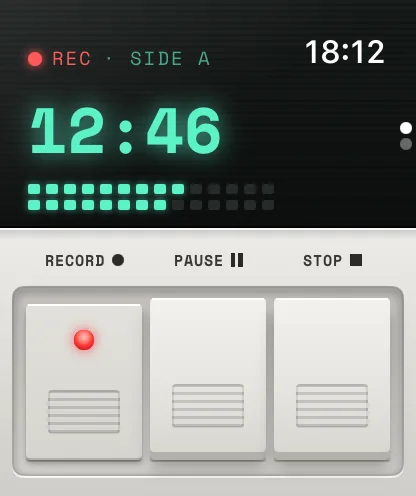
- Press RECORD on the watch. It uses the watch's microphone, and the first time it asks for permission to use it.
- Press PAUSE to hold the tape if you need to, and press it again to carry on with the same tape.
- Press STOP. The tape goes to your iPhone, and the watch shows SENDING until it arrives, then ON IPHONE.
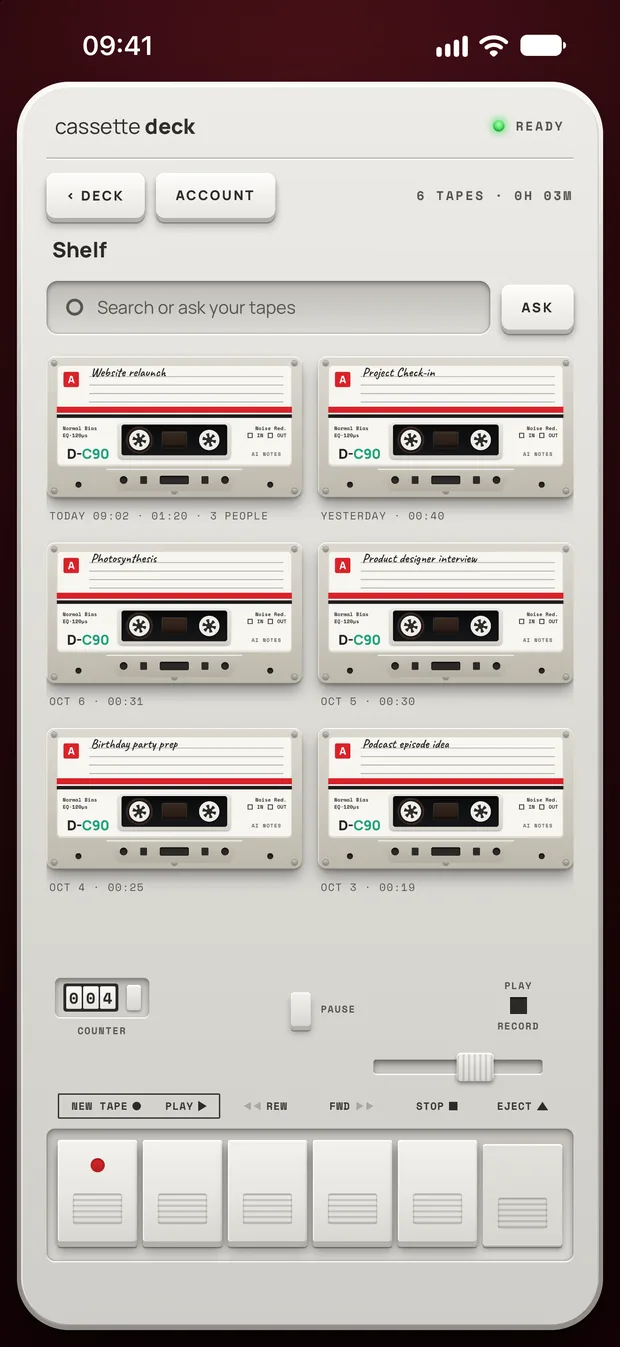
- Read the notes on your iPhone. The tape lands on your shelf with the others, with its transcript and notes.
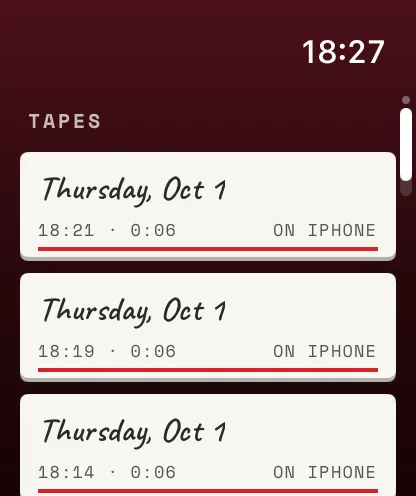
The watch doesn't play tapes back or show notes. Once your iPhone has a tape, its audio leaves the watch, and you listen on the phone.
If your iPhone is out of reach, the tape stays on the watch and goes across later. If it keeps saying SENDING, bring the two close together and open Cassette on both.
Start a tape faster
On a wrist, every extra tap counts. Two quick ways work on any supported watch, and both begin recording right away.
- From the watch face. Touch and hold the face, tap Edit and swipe left to the last screen. Tap a complication, turn the Digital Crown to Cassette's Record, press the Crown to save, then tap the face. Not every face offers complications.
- With Siri. On the watch, say "Start a tape in Cassette."
What the iPhone writes from a watch tape
A watch tape is treated like any other tape. Cassette picks the kind of notes from what it hears, so a thought spoken to yourself in English usually becomes a voice note, with a short gist, a list of to-dos with the day if you named one, and any ideas.
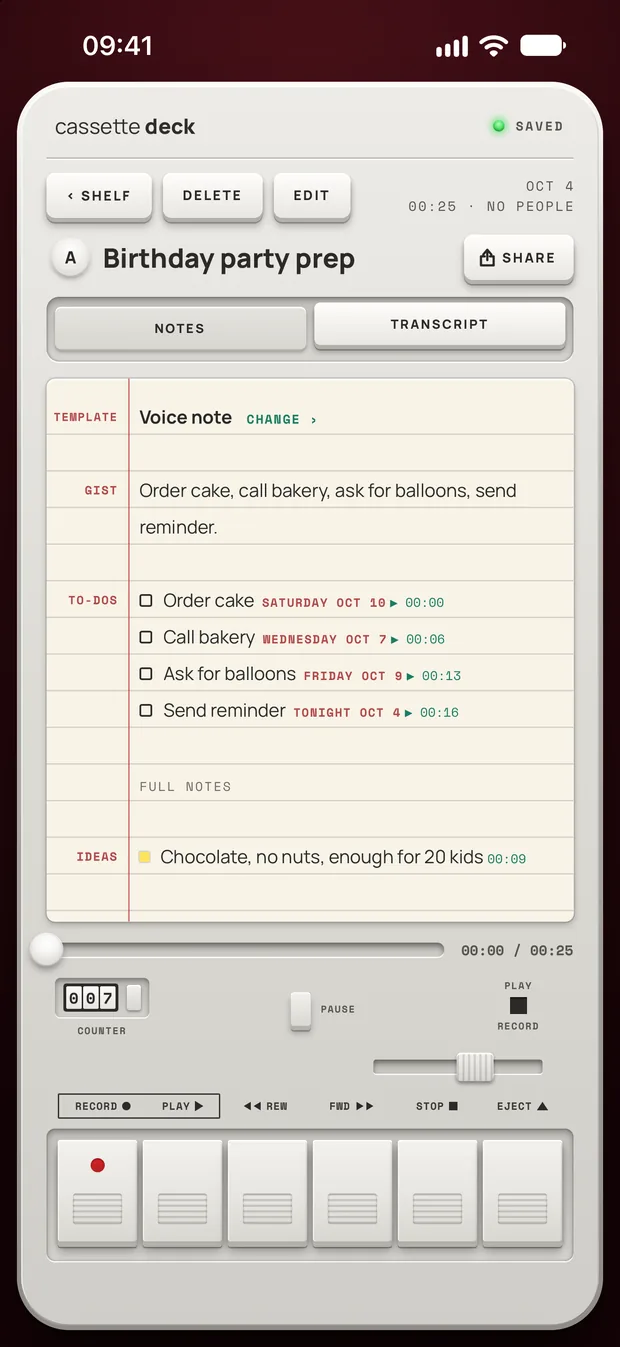
The watch has no language setting. Tapes are heard in the recording language you chose on your iPhone.
An iPhone without Apple Intelligence, or on a version before iOS 26, gets the recording, the transcript and a few lines quoted from the tape, with no summary, to-dos, outline, terms, review cards or template choice. A tape in another language gets a plain summary lifted from its own sentences instead. If Apple Intelligence is only turned off, turn it on and Cassette can write the notes.
Which one should you use?
- Use Voice Memos if you only want the audio, you want to play it back on your wrist, or you want it on your Mac through iCloud.
- Use Cassette if what you need afterwards is a list: the to-dos, the gist, and a transcript you can tap to reach a moment on the tape.
Get a clearer recording from your wrist
- Talk toward the watch. It tends to work best for your own voice, because your wrist can come up close to your mouth.
- Keep your sleeve off it. Cloth rubbing on the watch can end up on the tape.
- Use your phone for a whole room. For a long class or a meeting with several voices, a phone laid on the table is usually closer to the people talking.
- Check the battery first. Recording for a long time is a poor match for a watch that is nearly flat.
Before you record
Ask first. Whoever you are recording should know about it, some places require everyone's consent, and it is the decent thing to do.
Try Cassette
Free to download. Recording is free and unlimited, tapes under 3 minutes get their transcript and notes free, and longer ones get them free for 2 tapes a month.
Questions
Does Apple Watch have a voice recorder?
Yes. Voice Memos is Apple's recorder on the watch, and you can play recordings back there too.
How long can you record on Apple Watch?
Apple's Voice Memos page gives no limit. Cassette sets no time limit on the watch either, so what's left of the battery and storage decides. If the watch fills up, the tape stops and keeps what was saved.
Does a call stop a Cassette recording on the watch?
A call pauses the tape, and what you have so far is kept. It carries on by itself afterwards when the system allows it. If not, the watch asks you to press PAUSE to go on.
Does Cassette work on Apple Watch without an iPhone?
You need an iPhone with Cassette installed. The watch can record while the iPhone is out of reach, but the transcript and notes are only written once the tape gets to the iPhone.
Can Cassette transcribe a recording I already made in Voice Memos?
No. Cassette only transcribes tapes it recorded itself, so start the tape in Cassette.
Is it free?
Voice Memos comes with the watch. In Cassette, recording is free. A tape under 3 minutes gets its transcript and notes free, longer tapes count toward the 2 free tapes a month, and Premium covers the ones after that.
Where does a Cassette watch tape go?
From the watch to your iPhone, then it follows the iPhone's rules. Notes are never written by an outside AI service. The iPhone transcribes the tape itself when your language and its speech model allow it, and otherwise Apple's servers do. On iOS 27, Apple's Private Cloud Compute can write the notes. Tapes on the iPhone are also included in iCloud and computer backups if you make them, and in your account backup if you sign in with Premium. On-device only, under Privacy in your Cassette profile on iPhone, stops this for new tapes once they reach the iPhone. If the iPhone can't hear a language itself, that tape stays a recording.
Related guides
- How to transcribe voice memos on iPhone or AndroidTurn a voice memo into text with the tools already on your phone. Steps for iPhone, Mac, Pixel and Samsung, and what Cassette adds.
- How to record a lecture on iPhone or AndroidRecord a lecture on your phone, mark what matters and get notes you can study from. Steps for iPhone and Android, with the built-in apps and with Cassette.
Sources
- Apple Watch User Guide: Record and play voice memos: https://support.apple.com/guide/watch/voice-memos-apd441786282/watchos
- Voice Memos User Guide: See your recordings on all your Apple devices: https://support.apple.com/guide/voice-memos/see-your-recordings-on-all-your-apple-devices-vma6cc4d0571/mac
- Apple Support: View a Voice Memos transcription on iPhone: https://support.apple.com/guide/iphone/view-a-transcription-iph00953a982/ios
- Apple Watch User Guide: Get apps in the App Store: https://support.apple.com/guide/watch/get-apps-apd99e3c6a68/watchos
- Apple Watch User Guide: Add complications to the watch face: https://support.apple.com/guide/watch/add-complications-to-the-watch-face-apd8d0b9c582/watchos